CHASQUI

Real-time voice translator for WindowsSpeak your language.
Hear theirs in yours.

Traductor de voz en tiempo real para WindowsHablá tu idioma.
Escuchá el suyo en el tuyo.

A small window on your desktop that translates speech as it happens: your calls in any app, both ways, or any video playing on your PC. Open source. Your own OpenAI key. You pay by the minute, nothing else.

Una ventanita en tu escritorio que traduce la voz mientras habla la gente: tus llamadas en cualquier app, de ida y vuelta, o cualquier video que suene en tu PC. Código abierto. Tu propia API key de OpenAI. Pagás por minuto y nada más.

DOWNLOAD FOR WINDOWSDESCARGAR PARA WINDOWS

27 MB · Windows 10/11 · no Python, no admin. On first run it asks for your API key.

27 MB · Windows 10/11 · sin Python ni permisos de administrador. En el primer arranque te pide la API key.

It is new and not code-signed yet, so you will see two warningsEs nuevo y todavía no está firmado, así que vas a ver dos avisos
  1. While downloading, the browser says it "isn't commonly downloaded". Edge: hover the download → … → Keep → Show more → Keep anyway. Chrome: Keep.
  2. When opening it, Windows says "Windows protected your PC": More info → Run anyway.
  1. Al bajarlo, el navegador dice que "no se descarga habitualmente". Edge: pasá el mouse sobre la descarga → … → Conservar → Mostrar más → Conservar de todos modos. Chrome: Conservar.
  2. Al abrirlo, Windows dice "Windows protegió tu PC": Más información → Ejecutar de todas formas.

Both mean "Microsoft hasn't seen this file much yet", not "this file is harmful". The installer is built from the public source by GitHub Actions.

Los dos quieren decir "Microsoft todavía no vio mucho este archivo", no "este archivo es dañino". El instalador se compila desde el código público con GitHub Actions.

or, with Pythono, con Python

$ pip install chasqui-translate

thendespués chasqui ui and press STARTy apretá START

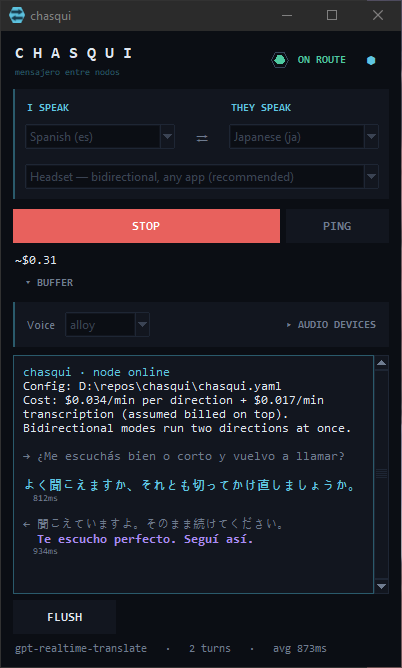
The chasqui window: language pickers, mode, Start, and a live transcript with each line and its translation

Three ways to use itTres formas de usarlo

media

their video → your earssu video → tus oídos

YouTube, a stream, a lecture, anything your PC plays. You hear it in your language while it plays.

YouTube, un stream, una clase, cualquier cosa que suene en tu PC. La escuchás en tu idioma mientras se reproduce.

$0.051/min · about $3 an hourunos $3 por hora

headset

you ⇄ them, any appvos ⇄ ellos, cualquier app

You speak your language and they hear theirs. They answer and you hear yours in your earphones. Zero config: it swaps your Windows default mic while it runs and gives it back on stop. Meet, Zoom, Teams, Discord.

Hablás en tu idioma y te escuchan en el suyo. Te contestan y vos lo escuchás en el tuyo, en los auriculares. Sin configurar nada: cambia el micrófono por defecto de Windows mientras corre y lo devuelve al parar. Meet, Zoom, Teams, Discord.

$0.102/min · two directionsdos direcciones

meet

you ⇄ them, through a virtual micvos ⇄ ellos, con un micrófono virtual

The same two-way call, wired by hand: you pick the virtual cable as the mic inside Meet or Zoom, and your Windows defaults stay untouched.

La misma llamada de ida y vuelta, conectada a mano: elegís el cable virtual como micrófono dentro de Meet o Zoom y Windows queda como estaba.

$0.102/min · two directionsdos direcciones

Help us test calls

Ayudanos a probar las llamadas

Translating videos works. Two-way calls are the newest part, and they need what we can't fake: a real call with a real person on the other side. If you have one coming up in Meet, Zoom, Teams or Discord, try chasqui in it and tell us how it went. Even "it didn't work" helps.

Traducir videos ya funciona. Las llamadas de ida y vuelta son lo más nuevo, y necesitan algo que no podemos simular: una llamada de verdad con una persona del otro lado. Si tenés una en Meet, Zoom, Teams o Discord, probá chasqui ahí y contanos cómo te fue. Hasta un "no anduvo" sirve.

  1. Install it and pick headset mode.
  2. Use it in your call for a few minutes.
  3. Fill in the one-minute form: which app, which languages, what worked and what didn't.
  1. Instalalo y elegí el modo headset.
  2. Usalo unos minutos en tu llamada.
  3. Completá el formulario de un minuto: qué app, qué idiomas, qué anduvo y qué no.

What it costsCuánto cuesta

$0.051 / minuteminuto

chasqui uses OpenAI's gpt-realtime-translate ($0.034/min) plus its live transcription, gpt-realtime-whisper ($0.017/min), which shows you the words and tells chasqui where each sentence ends. Both are billed by the minute of audio, not by tokens. No subscription, no account with us: the bill comes from your own OpenAI key, and the window shows a running total while you talk.

chasqui usa gpt-realtime-translate de OpenAI ($0.034/min) más su transcripción en vivo, gpt-realtime-whisper ($0.017/min), que te muestra las palabras y le indica a chasqui dónde termina cada frase. Las dos se cobran por minuto de audio, no por tokens. Sin suscripción y sin cuenta con nosotros: la factura llega de tu propia API key de OpenAI, y la ventana te muestra el total mientras hablás.

A two-way call runs two streams at once, so it costs double. Checked against a real OpenAI bill in October 2026: the transcription is charged on top of the translation, not included.

Una llamada de ida y vuelta usa dos streams a la vez, así que cuesta el doble. Verificado contra una factura real de OpenAI en octubre de 2026: la transcripción se cobra aparte de la traducción, no viene incluida.

SessionSesiónCostCosto
10 min YouTube videoVideo de YouTube de 10 min$0.51
1 h streamStream de 1 h$3.06
30 min call, both waysLlamada de 30 min, ida y vuelta$3.06
1 h call, both waysLlamada de 1 h, ida y vuelta$6.12

What you needQué necesitás

  • Windows 10 or 11Windows 10 u 11
  • An OpenAI API key with access toUna API key de OpenAI con acceso a gpt-realtime-translate
  • VB-Audio Cable (free) for calls; the setup window tells you if it is missingVB-Audio Cable (gratis) para las llamadas; la ventana de configuración te avisa si falta
  • Python 3.11+ only if you install with pipPython 3.11+ solo si instalás con pip
  • 12 languages: English, Spanish, Portuguese, French, German, Italian, Japanese, Korean, Mandarin, Arabic, Russian, Hindi12 idiomas: inglés, español, portugués, francés, alemán, italiano, japonés, coreano, mandarín, árabe, ruso, hindi
  • Linux and macOS: text mode only, for nowLinux y macOS: solo modo texto, por ahora

QuestionsPreguntas

How do I translate a Zoom, Meet or Teams call in real time?

Pick headset mode and press Start. You speak your language and the other person hears a translated voice in theirs; they answer and you hear it in yours, in your earphones. It works in any app that uses the Windows default microphone, because chasqui swaps that microphone for a virtual cable while it runs and gives it back when you stop. You need the free VB-Audio Cable. Two-way calls are the newest part, so tell us how yours went.

Can it translate a YouTube video or a livestream?

Yes, that is media mode. It listens to whatever your PC is playing, YouTube, a Twitch stream, a lecture, a podcast, and speaks it in your language while it plays, with the transcript in the window. It costs about $3 an hour.

Is chasqui free?

The app is free and open source (MIT). The translation itself runs on OpenAI with your own API key: $0.051 per minute of audio for one direction ($0.034 translation plus $0.017 transcription), $0.102 for a two-way call. There is no subscription and no account with us, and the window shows the running cost while you talk.

How long is the delay?

Usually a second or two behind the speaker: we measured about 1.6 seconds from the original words to the translated voice. The model waits for a few seconds of audio after a sentence to finish it, so the last words of a turn can come a little later.

Which languages does it translate?

Twelve, in any direction between them: English, Spanish, Portuguese, French, German, Italian, Japanese, Korean, Mandarin, Arabic, Russian and Hindi.

Does my audio go through your servers?

No. chasqui connects straight from your PC to the OpenAI Realtime API with your key. There is no chasqui server, account or analytics in between, and OpenAI's API data policies apply to the audio.

Does it work on Mac or Linux?

Not for audio yet. Calls and video translation need Windows 10 or 11, because chasqui switches Windows audio devices for you. On Linux and macOS the text mode works with pip install chasqui-translate.

Why does Windows warn me about the installer?

Because it is new and not code-signed yet, so Microsoft has not seen the file often. The warning means "unknown", not "harmful". The installer is built from the public source code by GitHub Actions, and you can read every line on GitHub.

¿Cómo traduzco una llamada de Zoom, Meet o Teams en tiempo real?

Elegí el modo headset y apretá Start. Hablás en tu idioma y la otra persona escucha una voz traducida en el suyo; te contesta y vos lo escuchás en el tuyo, en los auriculares. Anda en cualquier app que use el micrófono por defecto de Windows, porque chasqui lo cambia por un cable virtual mientras corre y lo devuelve al parar. Necesitás VB-Audio Cable, que es gratis. Las llamadas de ida y vuelta son lo más nuevo, así que contanos cómo te fue.

¿Puede traducir un video de YouTube o un stream en vivo?

Sí, es el modo media. Escucha lo que esté sonando en tu PC, YouTube, un stream de Twitch, una clase, un podcast, y lo dice en tu idioma mientras se reproduce, con la transcripción en la ventana. Cuesta unos $3 por hora.

¿chasqui es gratis?

La app es gratis y de código abierto (MIT). La traducción corre en OpenAI con tu propia API key: US$0.051 por minuto de audio en una dirección ($0.034 de traducción más $0.017 de transcripción), US$0.102 en una llamada de ida y vuelta. No hay suscripción ni cuenta con nosotros, y la ventana te muestra el costo mientras hablás.

¿Cuánta demora tiene?

En general uno o dos segundos detrás de quien habla: medimos unos 1,6 segundos desde las palabras originales hasta la voz traducida. El modelo espera unos segundos de audio después de una frase para terminarla, así que las últimas palabras de un turno pueden llegar un poco más tarde.

¿Qué idiomas traduce?

Doce, en cualquier dirección entre ellos: inglés, español, portugués, francés, alemán, italiano, japonés, coreano, mandarín, árabe, ruso e hindi.

¿Mi audio pasa por sus servidores?

No. chasqui se conecta directo desde tu PC a la API Realtime de OpenAI con tu key. No hay servidor, cuenta ni analítica de chasqui en el medio, y al audio se le aplican las políticas de datos de la API de OpenAI.

¿Funciona en Mac o Linux?

Para audio todavía no. Las llamadas y la traducción de videos necesitan Windows 10 u 11, porque chasqui cambia los dispositivos de audio de Windows por vos. En Linux y macOS funciona el modo texto con pip install chasqui-translate.

¿Por qué Windows me avisa al instalarlo?

Porque es nuevo y todavía no está firmado, así que Microsoft vio poco el archivo. El aviso quiere decir "desconocido", no "dañino". El instalador se compila desde el código público con GitHub Actions, y podés leer cada línea en GitHub.
Tell us how it wentContanos cómo te fue

chasqui is young. The most useful thing you can do is use it for something real and tell us what happened, good or bad.

chasqui es nuevo. Lo más útil que podés hacer es usarlo para algo real y contarnos qué pasó, bueno o malo.